An AI manuscript writing platform for medical and clinical researchers
Before you submit,see what to revise first.
Review your Word or PDF manuscript for gaps in the argument, inconsistent numbers and tables, and key reporting items. See source passages and revision priorities, then decide what to change.
Review the argument and evidence, check consistency across numbers and tables, and see what to revise first.
Drop your manuscript here
A draft in progress is welcome.
Word.docxFix each point in the editor
PDF.pdfCheck each point beside the original page
First review freeSaved as a project in your account
After you choose a file, confirm the manuscript type and specialty.
A real reviewExcerpt from an actual Health Check result on an English manuscript.
Risks to fix first
4
STROBE items checked
18
Source blocks read
85/85
MajorReviewer
Go to paragraph
Inconsistent counts and denominators for pathogens and outcomes
Supporting passages
Abstract
“The most common pathogen was the Pseudomonas species in 14.4% of the bacterial keratitis cases”
Discussion
“The predominance of Pseudomonas species (10.9%) in our cohort”
Suggested change
Pick one unit of analysis (patient, eye or isolate), recompute every percentage and Table 3 total, and align the abstract, Results and Discussion.
Causal explanations and regional treatment advice rest on very small, partly non-significant subgroups
Cohort selection and prognostic analysis are insufficiently documented+1 more
Reporting completeness · STROBE
Met 5Missing 0Unclear 7Not evaluable 5Not applicable 1
The actual workspace
See a manuscript in the real editor
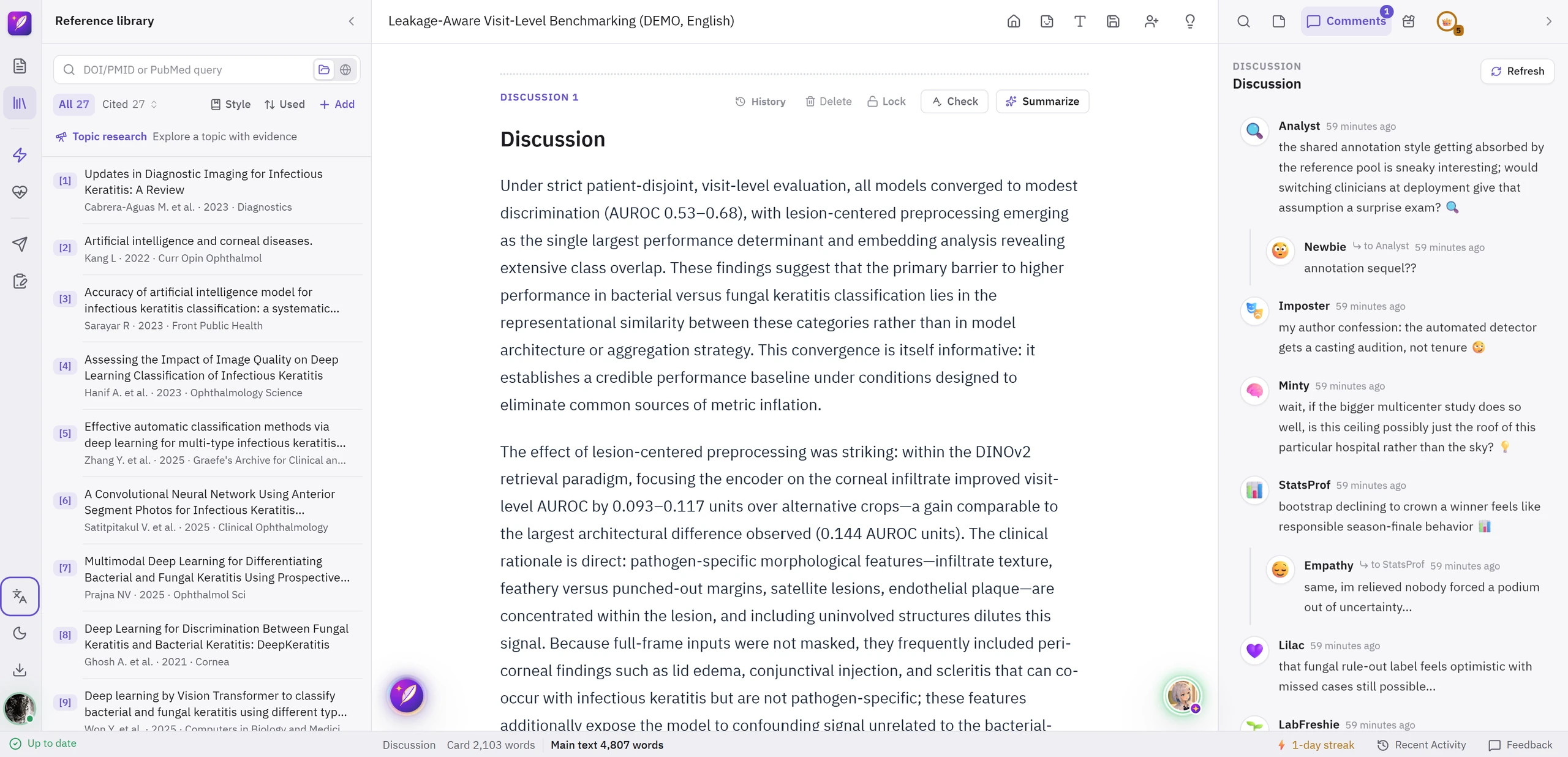
The actual editor, with references, the start of Discussion and AI reader reactions side by side.
Manuscript text is in English. The interface and AI reactions follow your selected language.
Sign in to open your own copy of this example. AI use in your copy follows your plan.
Discussion · Actual workspace
Write, connect, and refine.
A workflow at a glanceFind the gap.
See your next step.1Choose a section2Explore the gap3Plan your revision
1Choose a sectionIntroThemesConclusion
Prior studies examining retired elite athletes have varied substantially in sport discipline, era of competition, and definitions of elite status.
2Explore the gapRecommended revisionTell readers upfront exactly which athletes and sports you are covering—and which ones you are not.Effect on interpretationWithout an explicit scope, readers cannot tell whether the conclusions apply to endurance or strength athletes, or to recent or historical cohorts.
3Plan your revisionFix these first
Name the sport disciplines the review includes
State the retirement era and age range covered
Add one scope sentence to the Introduction
Condensed from the demo recording.
Make the scope clear before readers have to ask.
Try a request like this“Identify where a reader may lose the argument in this section and where I need to explain the study scope more clearly.”
A small discovery, an unexpected question, a reply to someone else’s reply. There is a little conversation around your draft.
Discussion
Refresh
🔥
Hypenow
wait 26.6% vs 3.17%?? same complication, and the whole gap is just where you start counting 🔥
🤔
Dreamernow
dumb question: if men hit more hyphema because they cheat on face-down time, is it really 'male' or is it the pillow? 🤔
🎭
Imposterto Dreamernow
confession: i told every male patient to stay face down and 'trust me bro' was not enough 😏
🔎
Cloudspotternow
treasure hunt update: found a stray [7] and a [8,9] hiding among the superscripts. the citation formats are playing hide and seek ✏️
📊
StatsProfnow
'different surgeons, but success rates were basically the same, so it's fine' is a bold alibi and i kinda respect it
🌱
LabFreshienow
so the takeaway for a baby resident is be gentle with pressure swings in high myopes, right? 🙋
😇
Stargazernow
ending on 'most of it heals and the final outcome stays the same' feels so comforting 🥹
Real AI reactions to a manuscript, shown in the current app layout. Notice each reader’s voice and the replies between them.
🔥 Hype spots a twist
🤔 Dreamer has a question
🎭 Imposter joins the thread
Curious questions, excited remarks, and a little encouragement. AI readers react to your sentences and sections in their own voices, each noticing something different.
Comments about what you actually wrote
Different voices and interests
Little conversations in comments and replies
Try a request like this
Write a Discussion paragraph, then request AI reactions. See which parts spark excitement, questions, or a moment of recognition.
AI Reactions provide short character comments. Section Critique reviews argument and structure; Health Check examines the whole manuscript.
Health Check: pre-submission review, including CARE and STROBE
Review reporting guidance, statistical consistency, and claims against evidence, then decide what to revise first.
Try a request like this
“Check whether the analysis unit in Methods agrees with the sample counts in Results, whether the conclusion overstates the findings, and what to revise first.”
Detected PDF figures with their captions when readable
Key items of CARE- and STROBE-based reporting guidelines
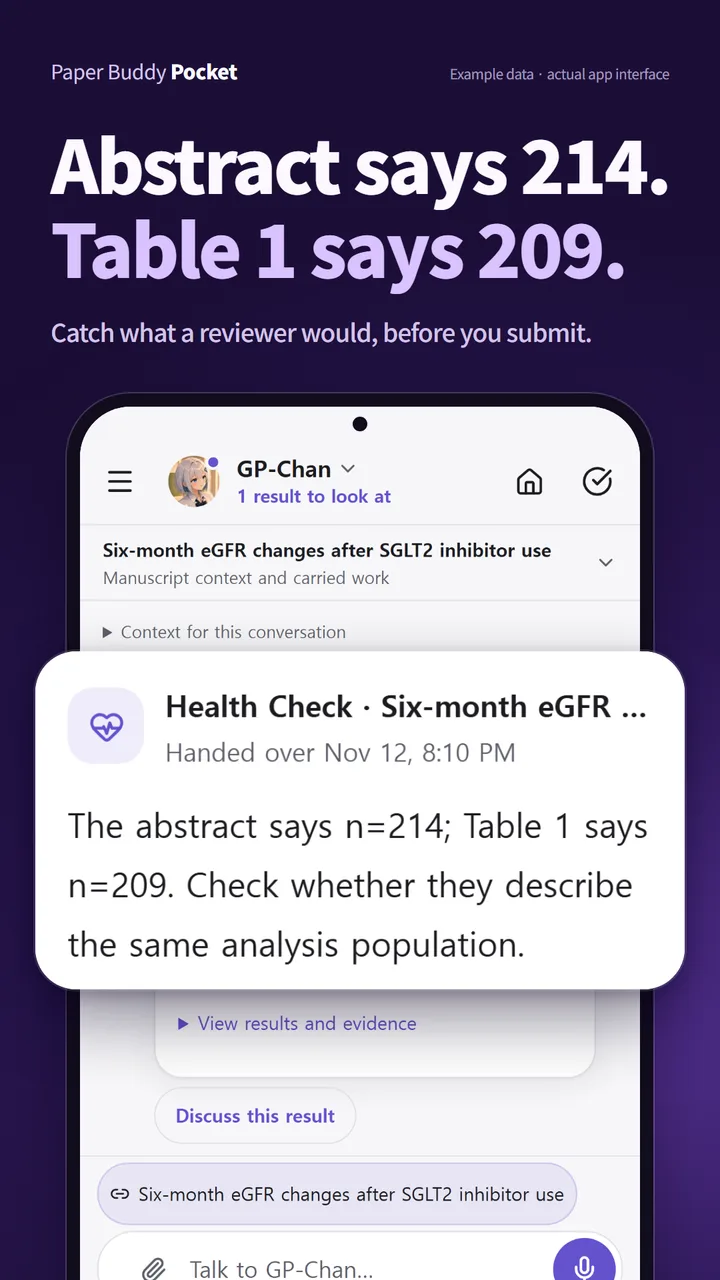
Consistency of numbers, tables and citations: unit of analysis, denominators, sample sizes
The argument and evidence from research question to conclusion
Does not check
Scanned PDFs and OCR
New literature searches during the check
Reanalysis of raw data
Every official checklist item, compliance or acceptance
PDF text must be selectable. Unreadable pages and text excluded by the input limit are disclosed in the result. Detected PDF tables and figures are checked with captions; unreadable or unreviewed items are listed. The applicable guideline and study design need your confirmation.
Search, cite and format beside your manuscript, with no plugin to install
Go from a PubMed search to an in-text citation and a formatted bibliography on one screen. You can also bring the references you keep in EndNote, Zotero or Mendeley, and Word manuscripts cited with them. It runs in your browser, and literature search and citation organization are included in the Free plan.
Search PubMed, cite at the cursor
Search from the manuscript screen and click Cite on a result to insert it at the cursor. No Word plugin to install, no switching between apps.
Adjust the style without code
After choosing a journal style, change the author limit and et al. rule, journal abbreviations, DOI display and bold or italics on screen, then save it. No CSL code to edit.
Read EndNote, Zotero and Mendeley files
Import RIS and BibTeX files exported from these tools, plus PubMed NBIB files.
Continue citing in your Word draft
Paper Buddy reads the EndNote, Zotero or Mendeley citation data still in the Word file to create references and relink in-text citations.
Citations that cannot be linked are counted for you to check. Compare imported details with the original papers.
Format a heading and switch between supported journal citation styles.
YOUR AI RESEARCH AGENT · PAPER BUDDY POCKET
The manuscript stays on your desk.
The questions come with you.
Continue the conversation about your manuscript from your phone, on the same account. Ask the question that just came up, hand off a literature search or a manuscript check, and come back to read the result.
Connect a manuscript and the conversation works from it.
Literature research and manuscript checks you hand off continue after you close the app. Turn on notifications to hear when the result is ready.
Compare a suggested revision with your original. Nothing changes until you approve it.
Full writing and editing continue in Paper Buddy on your PC. AI features depend on your account plan and usage limits.
THE CLOSING CHAPTER · WITH PAPER BUDDY
It started with a question.
Now look at what you have written.
Talk through the stuck moments and choose one small task to try today. When you reach the end, look back at the conversations and time between the sentences.
Talk through the research process
Choose a concrete next task
Continue from conversation into manuscript work
Try a request like this
“I am not sure where to pick up the draft today. Help me choose one small task I can start.”
No. You remain the author. Paper Buddy helps you plan, structure, ground, and review your manuscript.
Q2. How is this different from ChatGPT or general AI tools?
Paper Buddy connects manuscript writing, references, and review in one workspace. Drafting and editing use your research details and current manuscript. When you request literature support, it uses saved references and external search services such as PubMed and Semantic Scholar. Dedicated review tools check statistical consistency and highlight claims that need stronger support.
Q3. How do you reduce AI hallucinations?
Answers draw on the references linked to your manuscript, and review tools point out evidence and numbers that need checking. AI can still misstate facts or citations, so verify key claims, numbers and references against the original sources before you use them.
Q4. Which article types are supported?
We currently support Original Articles, Case Reports/Series, and Narrative Reviews, each with its own structure, onboarding flow, and review criteria. Before submission, Health Check applies key CARE items to case reports and case series, and key STROBE items for the study design (cohort, case-control or cross-sectional) to observational studies, based on what the manuscript states.
The underlying architecture is ready for expansion to additional research domains and article types.
Q5. Is it suitable for collaborative writing?
Yes. Realtime co-editing, role-based access, and project sharing let co-authors work together, and precise recovery restores only the part that went wrong.
Q6. Which research fields can use Paper Buddy?
Paper Buddy supports research in clinical medicine, dentistry, and nursing. Search for a field and select it directly. If it is not listed, choose the relevant Other field and enter its name.
Title suggestions, initial drafting, PaperChat, and manuscript review are shared features without field-specific access limits. They use the research details you provide, your current manuscript, and supplied evidence.
Manuscripts are written in English. The interface and AI reactions follow your selected language: English, Korean or Japanese.
Q7. Is there a free trial?
Paper Buddy is free to start — no credit card required. Free usage refreshes every 24 hours, and PB Companion is available as a monthly or yearly subscription when you want steadier paid access.
Q8. Is my research data used to train AI models?
No. Paper Buddy does not use your manuscripts, research data or AI conversations to train AI models. We use AI providers under terms and settings that prohibit using this content for model training. Content needed for AI features is sent to these providers for processing. See our Privacy Policy for processing and retention details.
Yes. Paper Buddy Pocket continues the conversation about your manuscript on the same account. Ask questions, hand off literature research or a manuscript check, and compare a suggested revision with your original before deciding whether to apply it. On Android, install Paper Buddy Pocket from Google Play. On an iPhone or a PC, open paperbuddy.app/pocket in your browser.
Full manuscript writing and editing continue in Paper Buddy on your PC. AI features depend on your account plan and usage limits.
Guides for researchers
From first draft to submission, find your next step
Read paper PDFs, choose tools, check sources and manuscripts, and respond to reviewers with practical guides for each step.