
What should you look at first for your task?
- If English editing is urgent: compare Paperpal and Writefull’s editing and integration workflows. A useful criterion is whether you can revise where you already write.
- If you are stuck on a first draft: examine Jenni’s autocomplete workflow. Prepare the research question, methods and actual results first, then check that generated sentences do not add unsupported facts.
- If finding and reading literature takes too long: examine SciSpace’s search and PDF question-answering tools. To connect search with citations while writing, also compare Paperpal Research and Paper Buddy’s workflows.
- If you want to connect medical writing with pre-submission review: view Paper Buddy’s card editing, literature, citation and Health Check workflows on its real screens.
These categories do not describe each tool’s only function. Many services combine writing, search and review. First decide which task you do most often, where you already edit and how much usage you need. [1][5][8][11][14]
How was this comparison prepared?
Official websites, help documents and public price lists were rechecked on October 20, 2026. Dynamically displayed prices were verified by switching billing periods in the browser. Where the official materials did not establish a capability’s scope, we left it unconfirmed; that does not mean the capability is absent.
Prices are public individual-plan rates in USD. Monthly billing and monthly equivalents under annual billing are distinguished; temporary coupons and institutional contract prices are excluded. Taxes, region, exchange rates and discounts can change the final amount, so revisit the official price list before paying.
For Korean-language support, we separately considered information sites, the editor interface, translation and AI responses. Marketing to medical researchers does not establish clinical accuracy or research validity.
Features and prices at a glance
All five services have a free tier or allowance, with feature-specific limits. The paid prices below are monthly billing amounts. Annual pricing is listed separately in each tool profile.
On a small screen, scroll the table horizontally. Select a tool name to jump to its profile.
| Tool and main purpose | Free access | Paid monthly billing | Korean-language support | Research scope |
|---|---|---|---|---|
| PaperpalAcademic English editing, translation, literature search and submission preparation | Available, with limits | Prime $25 / Pro $59[2] | Korean information site and Korean translation support. A fully Korean editor interface was not confirmed.[1][3][21] | Academic writing across disciplines. Pro also targets clinical documents. |
| Jenni AIDraft autocomplete, citations and revision | Available, with limits | Plus $30 / Pro $73[5] | Korean is listed as a supported interface language. Interface and AI writing languages are separate settings or behaviors.[5][6][25] | Academic writing across multiple disciplines. |
| WritefullAcademic language editing in Word and Overleaf | Available, with limits | Premium $21[9] | Its proprietary language editing focuses on English academic text. Korean interface support was not confirmed.[8][10][25] | Academic writing generally. Different features use different models. |
| SciSpaceLiterature discovery, PDF questions and research tasks | Available, with limits | Premium $20 / Advanced $90 / Max $200[11] | The scope of Korean interface support could not be established from the official materials checked.[11][12] | General research platform with a separate Biomedical Agent. |
| Paper BuddyMedical manuscript drafting, citations and pre-submission review | Available, with limits | PB Companion $12.99[16] | Korean interface and AI response options. The manuscript workflow centers on English writing.[14][15] | Clinical medicine, dentistry and nursing; original articles, case reports/series and narrative reviews. |
Sources for free access and data policies are linked in the profiles and data comparison below. A monthly equivalent under annual billing is not a price you can pay for just one month.
Each tool’s strengths, limits and suitable tasks
Paperpal — Academic English editing, translation, literature search and submission preparation
Edit and translate academic English, then move on to pre-submission checks. Paperpal advertises Word, Google Docs and Overleaf integrations as well as its web editor, offering options for researchers who want to keep their existing writing environment. Research offers literature-based answers to questions, reference saving and citations within the same writing environment, according to Paperpal. [1][3][21]
What to check: Fluent grammar does not establish that the study design, analysis or interpretation is sound. After translation, check that key terms, numbers, negation and expressions of uncertainty retain their original meaning.
Price: Billed monthly: Prime $25 / Pro $59. Billed annually: Prime $144/year / Pro $348/year. [2]
Useful for: Improving the wording of an existing English manuscript or turning Korean notes into English sentences.
Jenni AI — Draft autocomplete, citations and revision
The main workflow combines autocomplete while writing with linked citations. Current plans also include AI editing, chat and reviews, so Jenni should not be treated solely as a sentence-completion tool. Digital Science acquired Jenni AI in October 2026. The company says the existing name, team, pricing and subscription plans will remain, with Dimensions research data integration planned for the coming months. [5][6][25]
What to check: A plausible draft may add results or evidence that the researcher never supplied. Even when a citation is attached, read the original paper to check whether it actually supports the sentence.
Price: Billed monthly: Plus $30 / Pro $73. Billed annually: Plus $12/month equivalent / Pro $29/month equivalent, billed annually. [5]
Useful for: You have prepared the structure and evidence but often struggle to start or continue a paragraph.
Writefull — Academic language editing in Word and Overleaf
Receive academic English feedback while editing in Word, with tools also available for Overleaf. Choose features such as title and abstract generation or paraphrasing according to the task. Writefull is part of Digital Science, the same company that owns Jenni AI. [8][10][25]
What to check: Processing differs between proprietary-model features and external AI features. Institutional licenses may restrict some external AI functions, so check what is available in the environment you will actually use.
Price: Billed monthly: Premium $21. Billed annually: Premium $150/year. [9]
Useful for: You write in Word or Overleaf and want academic language feedback within that editing workflow.
SciSpace — Literature discovery, PDF questions and research tasks
Combines literature search, questions about PDFs and writing tools such as AI Writer. SciSpace also advertises a Biomedical Agent, so it would be inaccurate to say it has no medical research features. [11][12]
What to check: Do not judge a paper’s suitability from search results or summaries alone. For a systematic review, separately record search strategies, databases, search dates and inclusion/exclusion criteria, then compare findings with the original papers.
Price: Billed monthly: Premium $20 / Advanced $90 / Max $200. Billed annually: $12 / $70 / $160 per month equivalent, billed annually, in the same plan order. [11]
Useful for: Finding relevant literature and understanding unfamiliar papers take most of your time.
Paper Buddy — Medical manuscript drafting, citations and pre-submission review
Edit a manuscript as cards while keeping drafts, proposed revisions, literature, citations and collaboration in the same workspace. Section Critique and Health Check help examine logic, reporting items, statistical descriptions and the connection between claims and evidence. [14][15]
What to check: Type-specific structures and review criteria currently cover Original Article, Case Report/Series and Narrative Review. Health Check does not reanalyze raw data or determine the likelihood of publication. Use the feature pages and demos to check how it fits your editing environment.
Price: Billed monthly: PB Companion $12.99. Billed annually: PB Companion $129/year. [16]
Useful for: You want Korean-language assistance while connecting drafting, citation management, revision and whole-manuscript review for an English medical paper.
Paper Buddy’s AI reader reactions are short comments and responses from distinct characters. Use them separately from Section Critique and whole-manuscript review. Check the feature overview for scope and the real demos for how the workflows operate.
How can you find and cite literature while writing?
Both Paperpal and Paper Buddy connect literature search, summaries and saved references with in-text citations while you write. Compare the actual citation workflow and the format your target journal needs, rather than feature availability alone.
On a small screen, scroll the table horizontally.
| What to compare | Paperpal Research | Paper Buddy |
|---|---|---|
| Search and summaries | Research answers questions with literature-based summaries and references that can be saved to a citation library, according to Paperpal. [21] | Use PubMed and Semantic Scholar search or AI literature research and summaries, then collect selected papers in the project. [14] |
| Search sources | Its help article, updated in 2024, lists PubMed, Crossref, Unpaywall, OpenAlex and preprint servers among R Discovery’s sources. [22] | Uses PubMed and Semantic Scholar search and references saved in the project. Search scope and filters vary by feature. [14] |
| In-text citations | Paperpal says you can check references and cite them in the same writing environment. [21] | Select an insertion point in the manuscript, then use the cite button on a PubMed search result or a literature-research result, including Semantic Scholar papers. You can also cite references saved in the library. [14] |
| Citation styles | Advertises more than 10,000 citation styles. [21] | Search and select from more than 10,000 styles, including extended catalog search. Examples: Vancouver, AMA and APA. [14] |
| Free plans and limits | Offers a free account with limited AI use. Check the current pricing and account screens for Research-specific limits. [23] | Literature search and citation organization are included in the Free plan. AI literature research and analysis count toward AI usage limits. [15] |
Search accuracy and coverage were not measured under identical conditions. PubMed coverage or style counts alone do not establish an advantage; check your required journal format in the actual interface. Paper Buddy features and access →
Steps for citing a PubMed paper in Paper Buddy
- In the current project, with editing permission, first select the citation insertion point in the manuscript.
- Search PubMed in the literature panel and identify the paper by its title, authors and year.
- Check the linked original and bibliographic details to establish whether the paper supports the sentence you want to cite. Full text is not accessible for every result.
- Use the result’s cite button, then check the in-text citation and bibliography. If you only saved the paper, you can also cite it from the library.
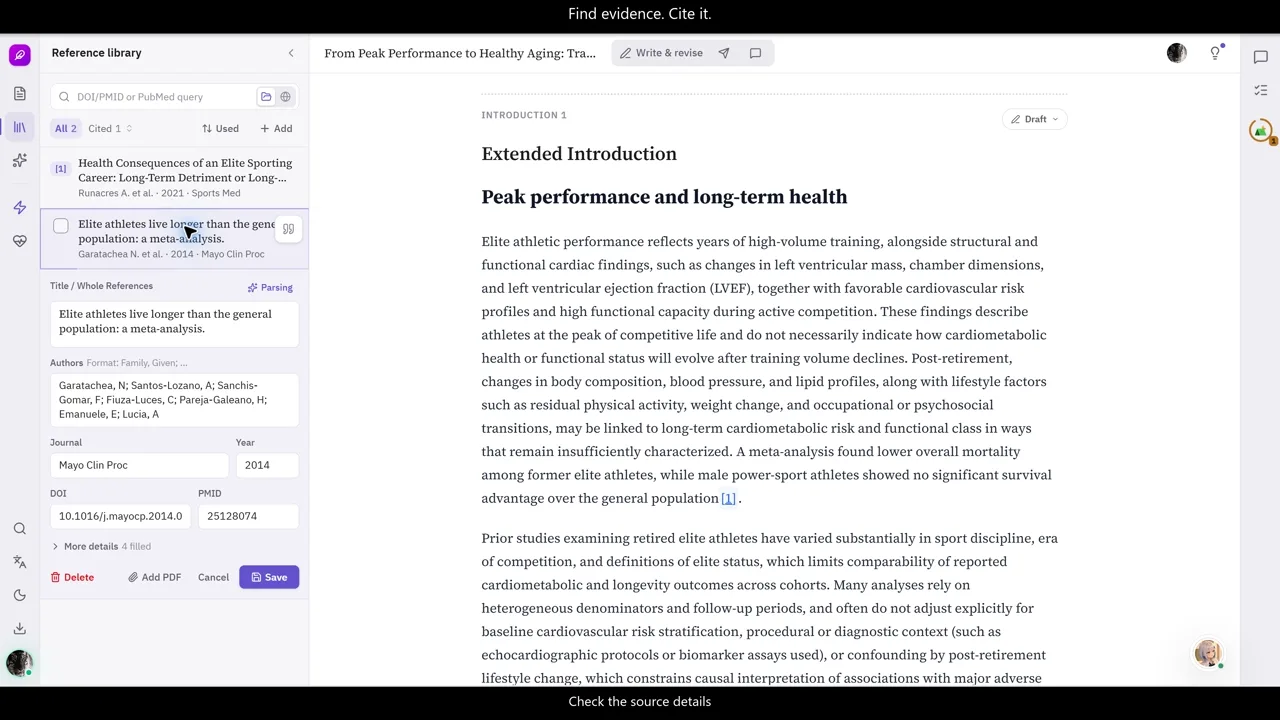
Steps from collecting literature to in-text citations and formatting →
How to verify the original passage and reference details before citing →
How to choose a reference manager such as EndNote or Zotero →
What do the two Health Check features examine?
Paperpal’s Document Health Check and Paper Buddy’s Health Check are features from different services. Check the scope and outputs in their official descriptions rather than assuming that the similar names mean identical checks.
On a small screen, scroll the table horizontally.
| What to compare | Paperpal Document Health Check | Paper Buddy Health Check |
|---|---|---|
| Main checks | Describes checks for language and grammar, plagiarism and similarity, AI-generated patterns, and reference verification in one document. [24] | Reviews manuscript logic, key reporting items for the study type, consistency of statistical descriptions and connections between claims and evidence. [14] |
| Using the results | Describes grammar suggestions and reports on similarity, AI detection and references. The detailed checks and report scope vary by plan. [24] | Examine whole-manuscript issues, reasons and revision priorities, then continue reviewing relevant findings in Paper Chat. [14] |
This compares publicly described capabilities, not accuracy measured under identical conditions. Paper Buddy’s Health Check reviews manuscript descriptions; it does not replace statistical reanalysis of raw data or predict publication outcomes. Verify either tool’s suggestions against the original sources and the work actually performed.
Google Deep Review and medical manuscript review
Google announced Deep Review on October 14, 2026. It checks logical consistency and mathematical statements, grounds claims and compares them with existing work. The launch includes two complimentary document reviews per week, with PDF and plain-text inputs initially supported. Higher-volume access uses a Gemini API key. Google Research launch announcement
For medical manuscripts, also consider reporting completeness and the work needed to apply findings. Paper Buddy connects manuscript editing, literature, citations, Section Critique and Health Check in one workspace. Check its Health Check scope and actual workflows against the task you need to finish. This comparison does not establish either tool’s accuracy advantage.
The Deep Review announcement does not specify item-by-item CARE or STROBE checks. That capability remains unconfirmed in the public description; this does not establish that the tool cannot assist with those guidelines. Compare any suggested omission with the applicable checklist and what the study actually did. Our reporting-checker comparison explains the difference between general critique and guideline checks.
Google states that uploaded documents are not used to train, fine-tune or improve its models, and are stored for one year to display them in the Deep Review interface. Review these published data-handling terms before uploading an unpublished manuscript. The Deep Review page words this differently: documents are not used for training without your permission, with an optional opt-in, and the tool may search the web. We compared it with Health Check on one clinical manuscript in this hands-on guide.
Can you upload an unpublished manuscript?
A no-training statement alone is not enough to decide whether an upload is appropriate. Training use, service storage, transmission to external AI and provider retention are separate questions. Check where a document is processed, how long it is retained, and the conditions for deletion and sharing.
- Paperpal
- Paperpal states that documents, uploads and personal information are not used for model training, including on the Free plan. Check its separate policies for storage periods and deletion conditions. [4]
- Jenni AI
- Jenni says it does not use drafts, prompts or outputs to train Jenni models. Relevant context may be sent to external providers for AI tasks; its documentation directs readers to the current privacy policy for provider terms and retention. [7]
- Writefull
- The Word user guide says text processed by Writefull’s own models is not stored or used for training. Some features send text to OpenAI or Anthropic after explicit consent. The guide describes temporary provider retention and says the text is not used for model training. [10]
- SciSpace
- The official help article says uploaded PDFs remain private and are not used for AI training for both Free and Paid users. This statement concerns uploaded PDFs; do not extend it to every feature’s inputs and outputs or all external-provider retention. [13]
- Paper Buddy
- Paper Buddy does not use manuscripts, research data or AI conversations for training. Content is sent to external AI only under terms and settings that prohibit training on it. Necessary context and files may be processed externally; service storage, caching and provider retention are separate considerations. [17]
If the material contains patient information or institutional non-public data, check your institution’s rules on external transfer and processing as well as the service description. Distinguish your own unpublished manuscript from someone else’s manuscript received for peer review. This guide summarizes providers’ public policies; it is not an independent security audit.
- Check for unnecessary identifiers, such as names, registration numbers and precise dates.
- Review document retention and deletion, external-provider processing and any additional institutional contract terms.
- Decide whether the entire manuscript is necessary or whether an authorized excerpt would suffice.
For medical papers: reporting guidelines and AI disclosure
Choose a reporting guideline for the study type. STROBE concerns observational studies, including cohort, case-control and cross-sectional studies. CARE organizes information, the clinical course and outcomes in case reports. Do not apply the same guideline to every manuscript just because it is medical. [18][19]
Use AI review to help find explanations missing from the manuscript. A statement that something was not reported does not establish that it was not done. Compare the original checklist with the actual work and add only factual, applicable information. Paper Buddy’s Health Check also reviews manuscript descriptions; it does not replace statistical reanalysis. See Health Check’s scope and result examples →
ICMJE recommends disclosing at submission whether and how AI was used and does not recognize AI as an author. Record the tool and, where possible, its version and dates, along with its purpose and scope: translation, editing, drafting, analysis or another task. Follow the journal’s current rules on disclosure location and format. Authors must verify results and citations. [20]
Even if you requested only language editing, check that the population, unit of analysis, effect direction, units and expressions of uncertainty have not changed. A tool’s ability to generate sentences does not remove the researcher’s responsibility to check facts.
Have a paper PDF ready? Practice asking about a passage and checking it against the original. →
Frequently asked questions
Which AI tool is best for writing a medical paper?
Start with the task that takes the most time. Compare Paperpal and Writefull for English editing, Jenni for draft autocomplete, and SciSpace for literature discovery and PDF reading. If you want to connect drafting, citations and review of an English medical manuscript, also examine Paper Buddy’s workflow. These are task-based suggestions, not an accuracy ranking. [1][5][8][11][14]
How do Paperpal and Jenni AI differ?
Compare Paperpal around academic English editing, translation and integrations with existing editors, and Jenni around autocomplete while writing and citation workflows. Both offer other drafting and review functions, so dividing them into “editing only” and “drafting only” would be misleading. [1][5]
Will an unpublished manuscript be used to train AI?
The scope of each service’s no-training statement differs. No training does not mean no storage or no transmission. Read the data-policy comparison and each service’s current privacy policy. Before using unpublished material or patient information, also check your institution’s rules on external transfer and processing. [4][7][10][13][17]
Can I start using an AI writing tool for free?
All five services compared have a free tier or allowance. AI-task, upload and export limits depend on the service, feature and plan. Paper Buddy can be started without a credit card, and AI usage replenishes daily within its limits. Check the current pricing page to see whether your needed features are included. [4][5][9][13][16]
Which tools support Korean?
Jenni lists a Korean interface in its official language documentation. Paperpal has a Korean information site and Korean translation support. Paper Buddy offers Korean interface and AI response options. Translation, interface language and AI response language are different capabilities; this comparison did not establish the scope of Korean interface support for Writefull or SciSpace. [6][3][1][14]
Can AI check STROBE or CARE reporting items?
AI can assist in finding missing explanations by comparing the manuscript with the applicable guideline. First check the guideline’s scope and original checklist, then compare any omission flagged by AI with what was actually done. An AI result does not certify reporting compliance, evaluate study quality or validate statistical analysis. [18][19][14]
Must I disclose AI use to the journal?
ICMJE recommends disclosure at submission of whether and how AI was used. Record the tool name and version, purpose and scope, then follow the journal’s current instructions on placement and format. AI cannot be listed as an author; human authors remain responsible for content and citation accuracy. [20]
Can I search and cite literature while writing?
Both Paperpal Research and Paper Buddy let you find literature while writing and connect it to in-text citations. Search, summaries and reference saving are shared capabilities: compare the actual citation steps, required journal formats and plan limits. Before citing an AI-suggested paper, check the relevant passage in the original and its bibliographic details. [21][14]
Official sources and verification
Existing pricing and policy sources were rechecked on October 20, 2026. Jenni, Writefull and SciSpace prices were checked by switching billing periods on their official pages. Paper Buddy prices were checked against its public pricing information. Literature search, citation and Health Check scope sources were checked on October 25, 2026. The Jenni AI acquisition announcement was reflected on October 31, 2026; pricing was not reverified for this update. Prices, features and policies may change.
- Paperpal: Korean feature overview
- Paperpal: paid subscription prices
- Paperpal: translation and multilingual support
- Paperpal: data security
- Jenni: pricing and plan comparison
- Jenni: interface languages
- Jenni: handling drafts, prompts and uploads
- Writefull for Word: features
- Writefull: official plans
- Writefull for Word user guide: AI and data handling
- SciSpace: pricing and features
- SciSpace: Biomedical Agent
- SciSpace: uploaded PDF protection policy
- Paper Buddy: features and manuscript types
- Paper Buddy FAQ: manuscript types, disciplines and free access
- Paper Buddy: current pricing
- Paper Buddy: AI processing and retention
- EQUATOR: STROBE study designs and checklists
- CARE: case report checklist
- ICMJE: AI use and disclosure by authors
- Paperpal: Research search and citation update (October 16, 2026)
- Paperpal: Research search sources (updated April 12, 2024)
- Paperpal: free account and AI usage limits
- Paperpal: Document Health Check scope (May 29, 2026)
- Digital Science: Jenni AI acquisition announcement (October 29, 2026)