
Before you start
- An internet-connected phone browser and a Paper Buddy account. Use the same account as on your PC to access its manuscripts.
- A manuscript already saved to the server, or a research idea to discuss. Unsaved text remaining only on your PC is not available on your phone.
- Check AI access, remaining usage and your institution’s and journal’s AI rules. Do not enter patient identifiers or material you lack permission to share.
Steps in Paper Buddy
These are authentic production mobile-web captures, taken on October 28, 2026 in a 390 × 844 Chrome viewport. They use a citation practice manuscript and a hypothetical study, with no patient data. Screens show the English interface and English tutorial conversations and results. Original paper titles and references retain their source language.
Open your workspace in a browser
Visit paperbuddy.app/projects on your phone, sign in and choose the manuscript you want to revisit. Start here to read your manuscript. For a conversation-first view, open paperbuddy.app/pocket. Both are web pages and require no separate app installation.
Read the saved manuscript and locate what needs attention
Use the section and card selector at the top to navigate the manuscript and its references. The phone manuscript viewer is read-only. Continue sentence editing and manuscript organization on your PC. First check that the displayed content is the saved version you intended to read.
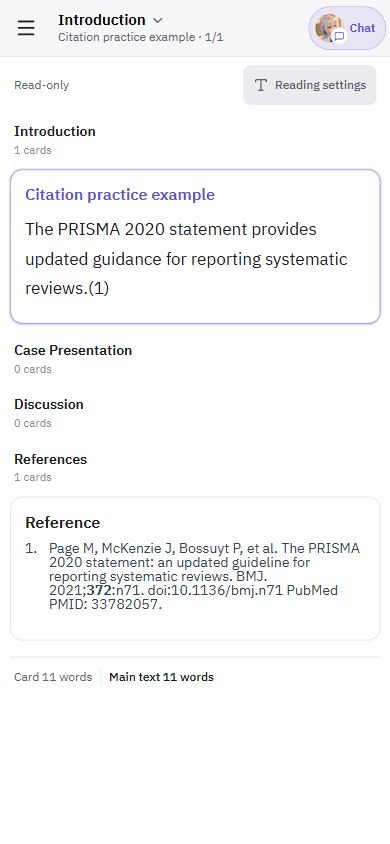
Manuscript view: an authentic English-interface capture showing a practice citation and its reference on a phone-sized screen. Connect the context and develop an idea with your companion
In Pocket web, the manuscript selector above the message box lets you connect a manuscript to the conversation. For a new study, choose the idea-development action. Discuss the population, comparison and outcomes to develop a direction and working title. Review the resulting idea card and save it. Conversation text does not automatically become manuscript text.
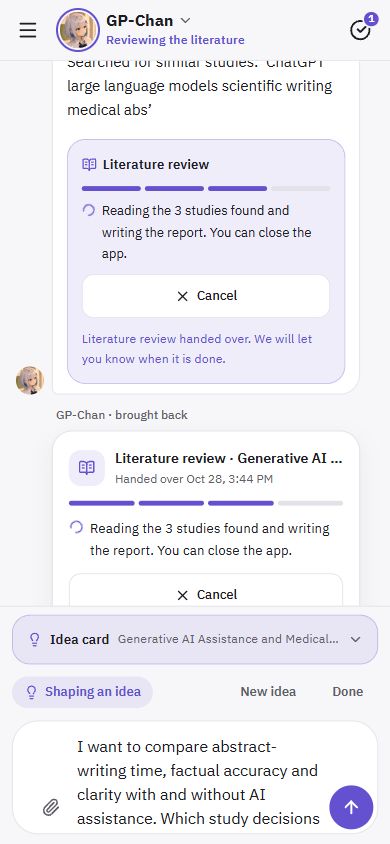
Idea development: a hypothetical comparison of time and accuracy in AI-assisted abstract writing. The text in the message box is an unsent draft. Start literature research for a saved idea
Request detailed literature research for your saved idea, then use the proposal card’s action to start it. Check the task status; asking in chat alone does not establish that a task has started. Once started, research runs on the server and can continue after you close the browser. Your account’s plan and usage conditions apply to AI research.
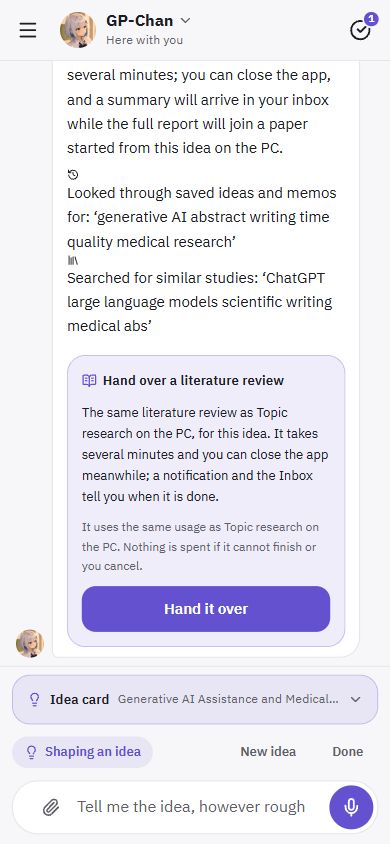
Research card: the proposal is ready to start. Choose “Hand it over” to begin; buttons and status text vary with the task stage. Read the results and choose your next question
Open the Inbox from the menu, or the result card in the conversation, to read the summary and suggested papers. The follow-up conversation action lets you ask about the result. Open the paper links and verify the original evidence yourself. An empty search is not evidence that no related study exists or that your idea is novel.
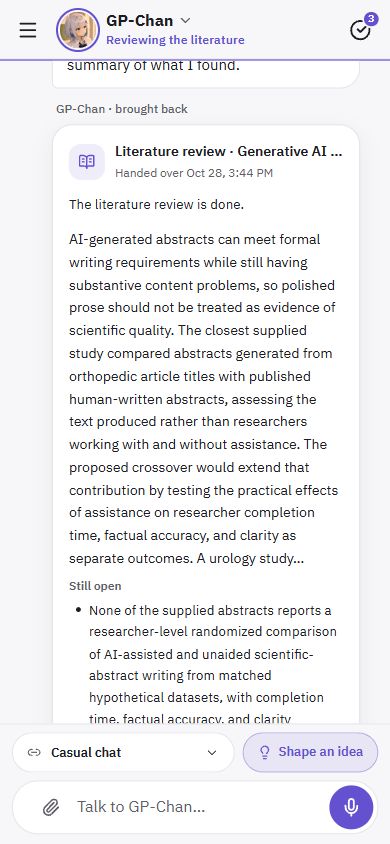
Research result: a real task run for a hypothetical idea, shown in the English interface. The summary is a draft to assess, not a guarantee of study validity or source quality. Continue the manuscript work on your PC
On your PC, start a manuscript from the saved idea to access its research report in that manuscript’s Topic research. Do not assume the result is automatically added to a different existing manuscript: check the project and report connection. Continue manuscript editing, in-text citation work and final submission-file checks in the PC workspace.
A four-line note for your next writing session
Leave four lines before stopping work. This practical note helps you choose where to resume and what to do, without first rereading the whole draft.
- Current location
- Record the project, file version, section and paragraph.
- What I checked today
- Include only facts you checked and their evidence locations.
- Open question
- Keep unverified points and pending decisions visible.
- One next action
- Prefer “compare the opening claim with Table 2” to “revise Discussion.”
Completed example · fictional manuscript
Current location: Reminder manuscript v3, opening Discussion paragraph.
What I checked today: Matched 82/100 and 70/100 in Table 2 to Results.
Open question: Check the analysis record for adjustment of group differences.
One next action: On my PC, open the analysis record, check adjustment and revise the opening interpretation.
Copy and complete this template
Current location: ______
What I checked today: ______
Open question: ______
One next action: ______- Record the draft version and location, then copy this template into your own notes and fill it in.
- To discuss the note, open Pocket, explicitly select the relevant manuscript and paste your note and request. Text from this guide is not sent automatically.
- On your PC, use the same account to open the correct project and saved version. Start with the next action in your note, then confirm your edits were saved.
Use my four-line note below to make one next action concrete. Separate verified facts from open questions and ask for missing material. Do not say that you have edited or saved the manuscript.
Plan the next action in Pocket →
The note does not create a task or scheduled reminder. Conversation alone does not apply manuscript edits. AI features have plan-based usage limits.
A request to adapt
Hypothetical study: you want to compare abstract-writing time with AI assistance, but have not yet selected the assessment method.
I am considering a study in which medical researchers write abstracts from the same hypothetical data with and without AI. I want to compare writing time, accuracy and clarity separately. Help refine the research question and ask about decisions I still need to make. If you cannot find prior studies, do not conclude that the idea is novel.
This is an example request. Adapt it to your manuscript and verified facts.
What to check yourself
- Are you signed in with the same account on your PC and phone?
- Was the intended manuscript saved to the server, and have you selected it?
- Have you checked idea saving and task-start status separately?
- Have you compared the summary and paper links with the original sources?
- Have you confirmed the project and research report connection on your PC?
Frequently asked questions
Do I need an app or a home-screen shortcut?
No app installation or home-screen shortcut is required to read manuscripts or chat in the browser. Web push has separate browser, operating-system and permission requirements. You can reopen the site to see results without enabling notifications.
Can I edit the manuscript directly on my phone?
The mobile manuscript viewer in this guide is read-only. Use your phone to read, discuss, develop ideas and review results; continue substantive text editing and submission preparation on your PC.
Will I receive frequent unsolicited messages?
For new users, proactive messages default to a quiet setting focused on results and waiting comments. Morning and daytime greetings are optional; existing choices are preserved. Where web push is supported, enable reply notifications in notification settings and allow browser permission. If that option is absent, check support and settings, and revisit the Inbox for results.
How are unpublished manuscripts and conversations handled?
AI features may process needed content, including a connected manuscript, on the server and through external AI providers. Paper Buddy does not use manuscripts, research data or AI conversations for model training or fine-tuning. Account and project data are kept while providing the service and deleted when deletion requests are processed. Trash, shared library files, legal exceptions and external-provider processing, caching and security retention have separate conditions. This does not promise zero retention or immediate erasure of every copy. See the privacy policy for details.
Does this replace a systematic literature review?
No. It produces research drafts to help develop an idea. Searches and paper selection may omit sources or contain errors. Authors must check original evidence, study design and interpretation. A systematic review requires its own protocol and verification. If usable evidence cannot be verified, the task may stop without a report; check the reason and refine the research question.