
Before you start
- A project you can edit and the sentence to cite. If citations are unavailable in a title or abstract, move to a body card named in the on-screen guidance.
- English search concepts or a known title, PMID or DOI. Have any existing PDFs, BibTeX, RIS or NBIB files ready too.
- Access to the original and the venue’s current citation requirements. A search result does not guarantee full-text access.
Steps in Paper Buddy
Based on the production app’s Korean interface captured October 26, 2026, public literature and a practice manuscript. Search, cite and style close-ups were edited with AI to add enlargement, numbers and arrows. Select an image to enlarge the annotated view; the separate original-capture link opens the unannotated UI. Counts and the interface may change; instructions name the corresponding English controls.
Place the cursor after the sentence to cite
Open a body card that accepts citations in your editable project and select the insertion point. The Introduction card in this example explains that PRISMA 2020 provides guidance for reporting systematic reviews. It is a practice sentence, not a declaration that a study was performed.
Run a PubMed search in the reference library
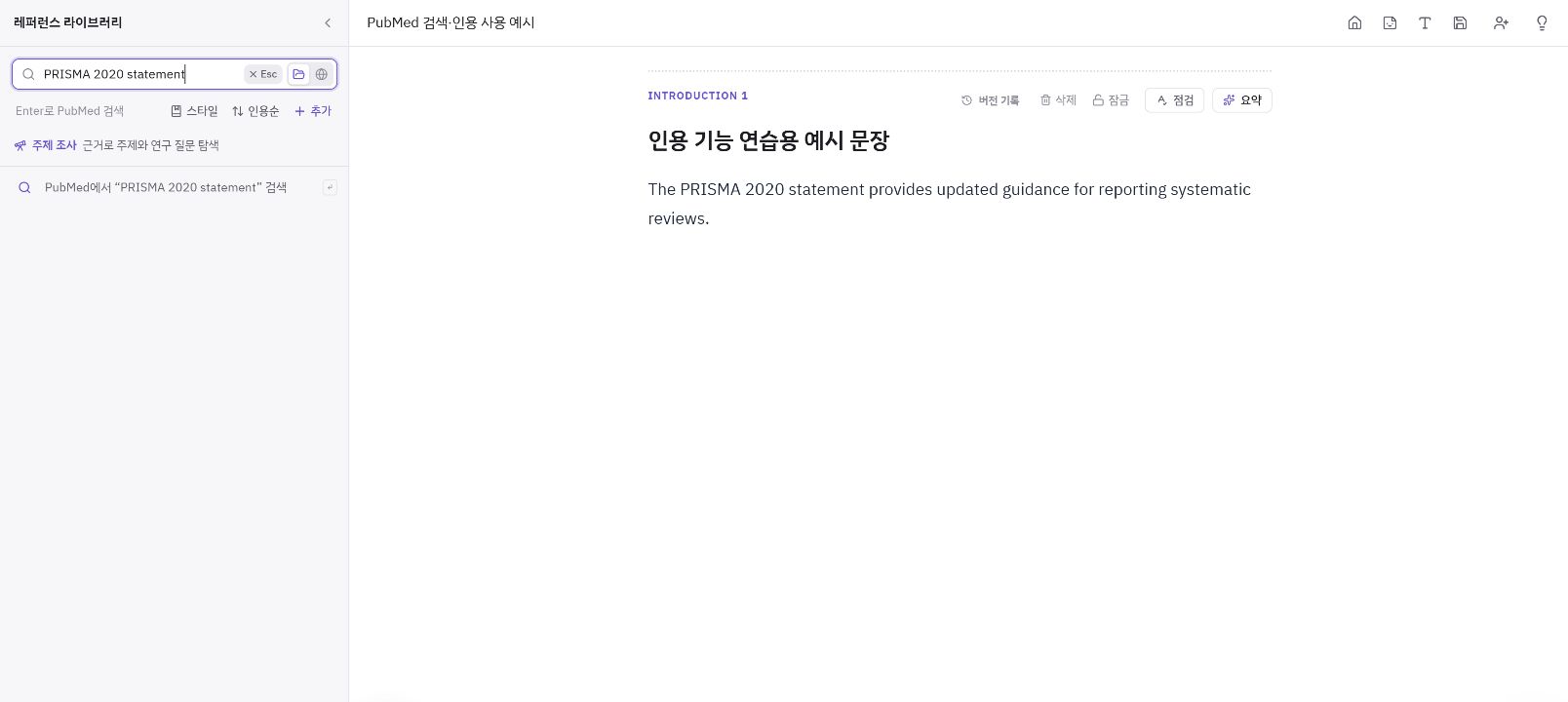
Open the reference library from the manuscript tools and enter PRISMA 2020 statement. Press Enter or select Search PubMed for “PRISMA 2020 statement”. Filtering existing library entries while typing is separate from running the external PubMed search. For a general topic, start with English concepts; add a condition when results are too broad, or remove conditions and try synonyms when too few appear.
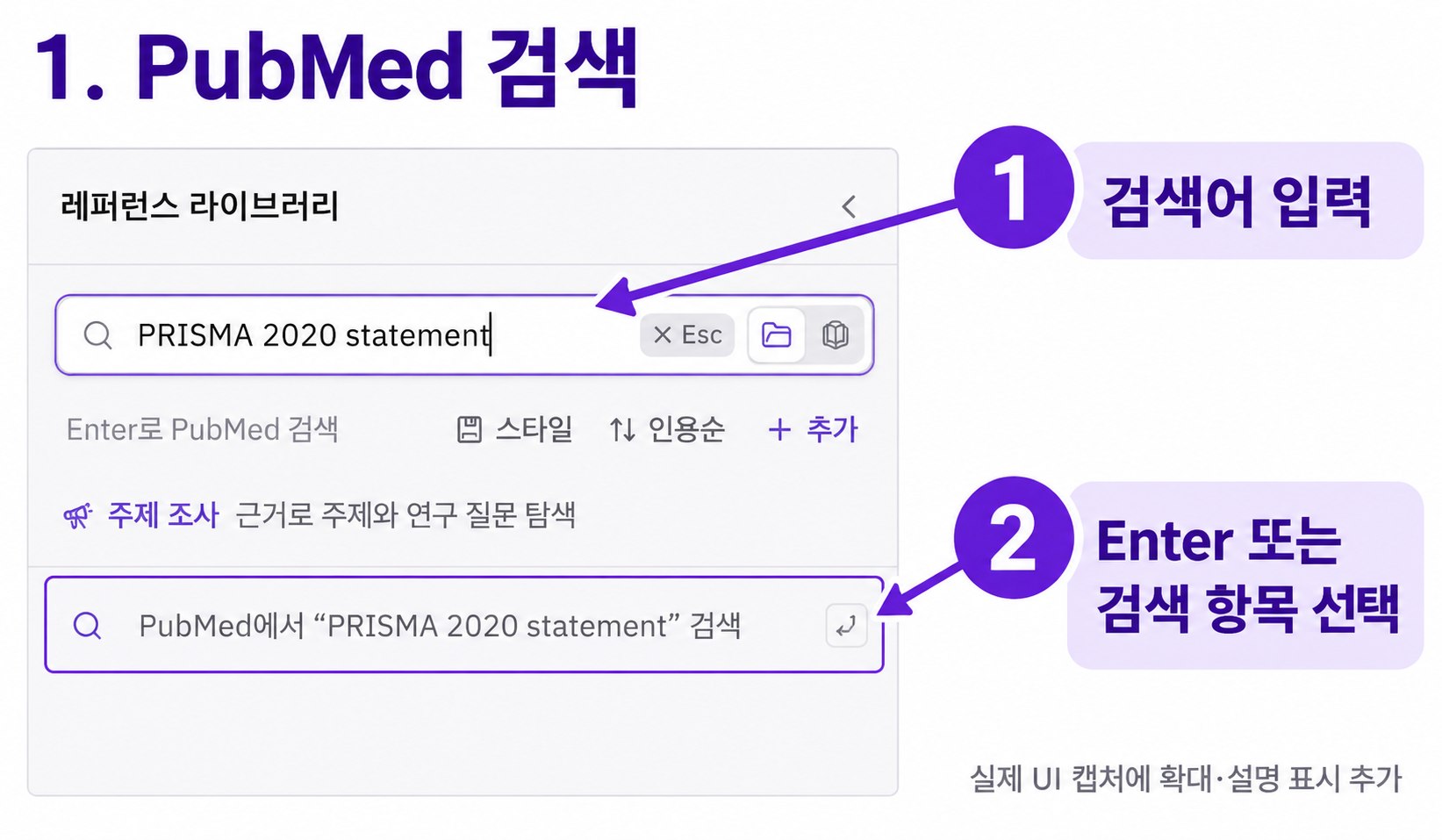
1: enter the query. 2: press Enter or choose the PubMed search action. AI-edited close-up of the Korean UI; the original capture is linked below. Original UI capture ↗ Check the selected record against the original
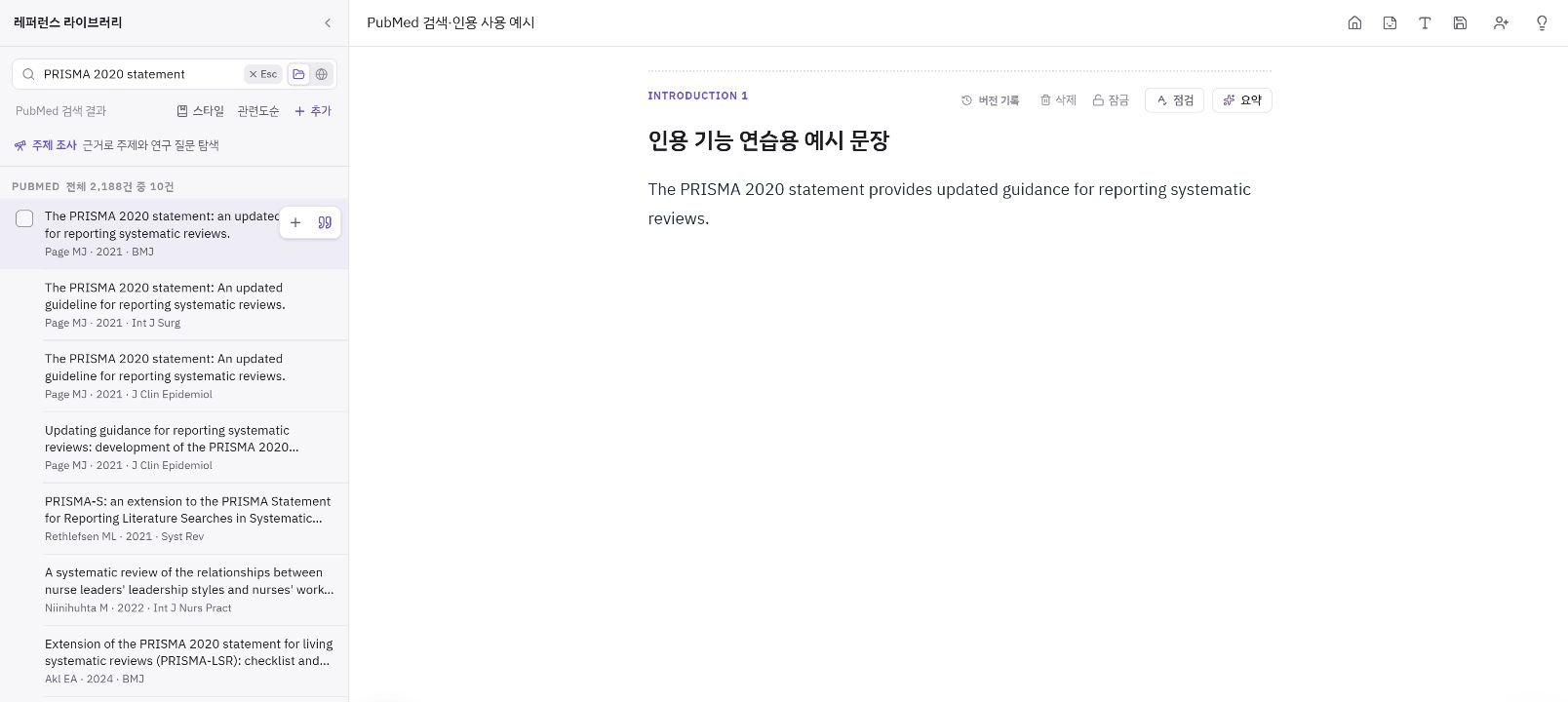
This example uses Page and colleagues, BMJ, 2021. Other journals published papers with the same title: compare authors, journal, year, PMID 33782057 and DOI 10.1136/bmj.n71. Open PubMed or the DOI source to check the relevant passage, population, methods, results and limitations. The link below the results also opens the same search on PubMed. An abstract or AI summary alone does not establish support for your claim.
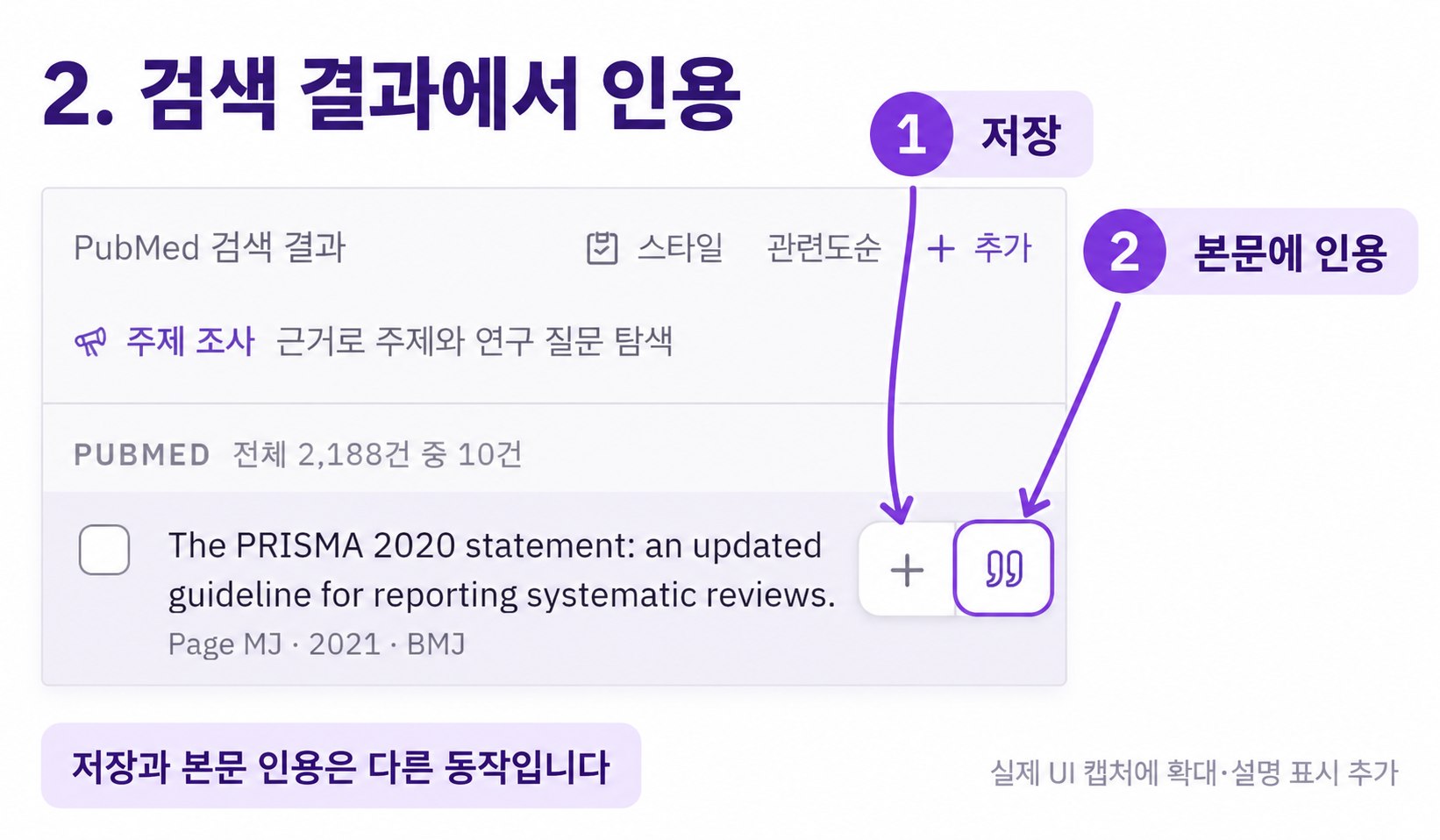
1 saves the paper; 2 cites it in the manuscript. Page et al. (2021), BMJ, is the example. AI-edited Korean UI close-up; the original is linked below. Original UI capture ↗ Choose between saving and citing
The plus button, Save to library, collects a paper for later reading. Saving alone does not insert a citation into the manuscript. The quotation-mark Cite button connects the paper to the selected manuscript position. You can cite directly from the search results without saving first, or cite a saved paper from the library later. If the app asks for an insertion point, return to the body and place the cursor again.
Check the in-text marker and bibliography together
In this example, [1] appears after the sentence and item 1 appears in References. Compare the library’s [1] status too. Clear the search or press Esc to return to the library list. Verify the cited title, authors, year, journal and DOI; recheck correspondence after adding, moving or removing references. Do not type citation numbers as ordinary text to force a match.
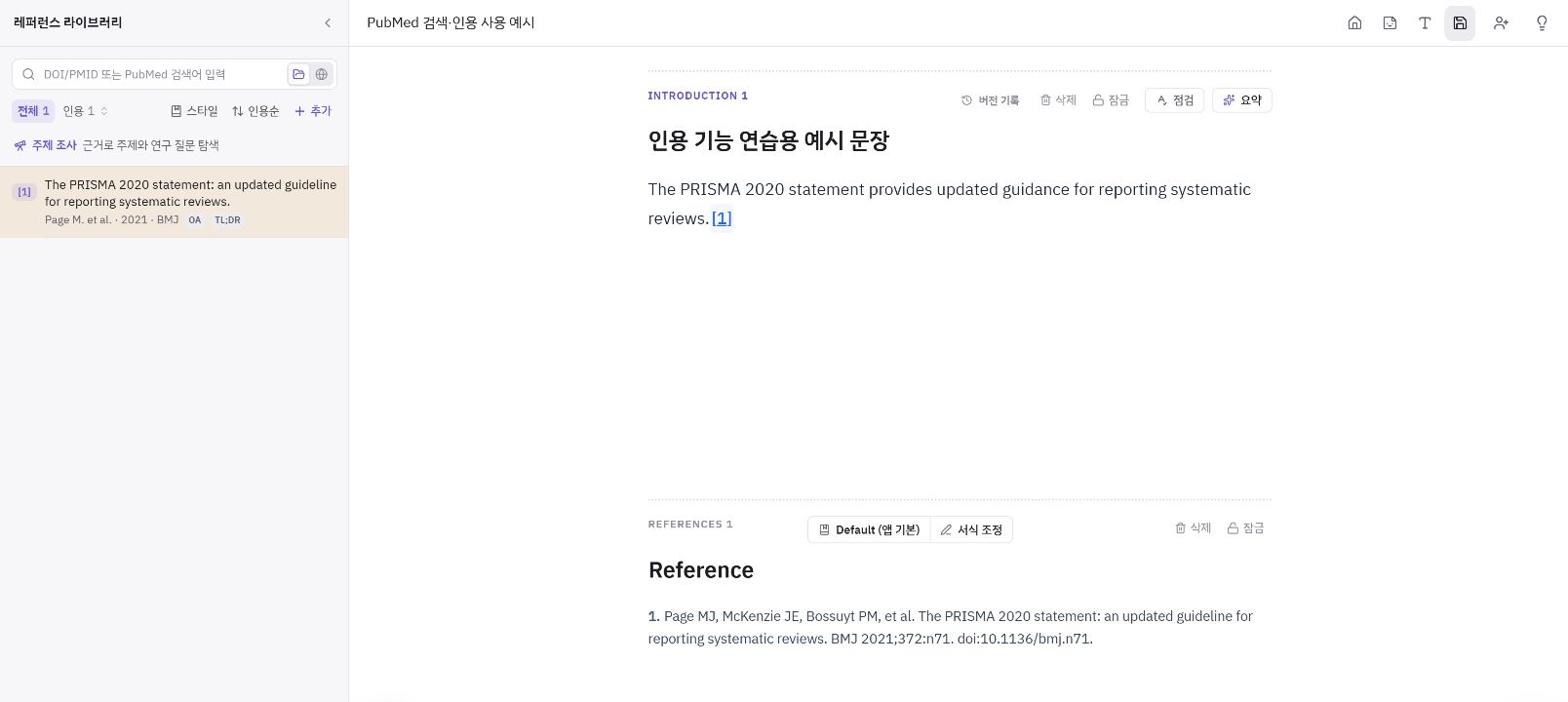
Check that [1] in the sentence and library and item 1 in References identify the same paper. The numeric markers shown use this example’s default style. Korean production interface. Adjust the bibliography details you need
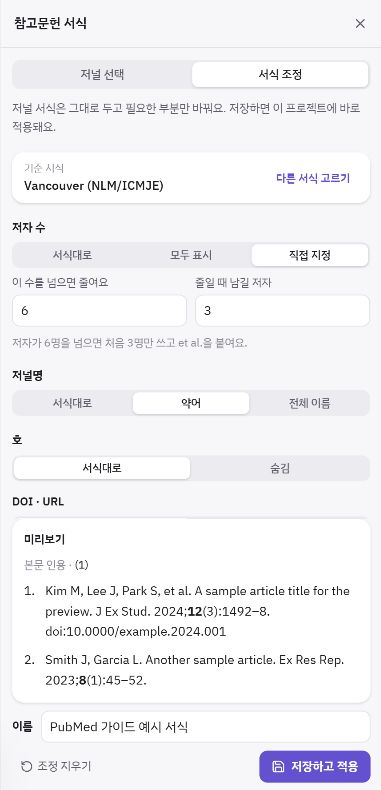
A practical strength of Paper Buddy is being able to refine the details after choosing a style. Open Style in the reference panel or the format control on References, choose a journal style or Vancouver, AMA or APA, then open Adjust style.
Change author limits and et al. rules, abbreviated or full journal names, issue and DOI/URL visibility, page ranges, and bold or italic emphasis for titles, journals, years and volumes.
The example lists the first three authors when there are more than six, abbreviates journal names and makes the volume bold. The preview uses sample references to demonstrate formatting. Give the style a name and choose Save and apply to apply it to the current project; saved adjustments can be selected again under your saved styles. In-text markers can also change with the base style.
Export the web manuscript to Word and check the actual file’s citations and bibliography against the venue’s instructions.
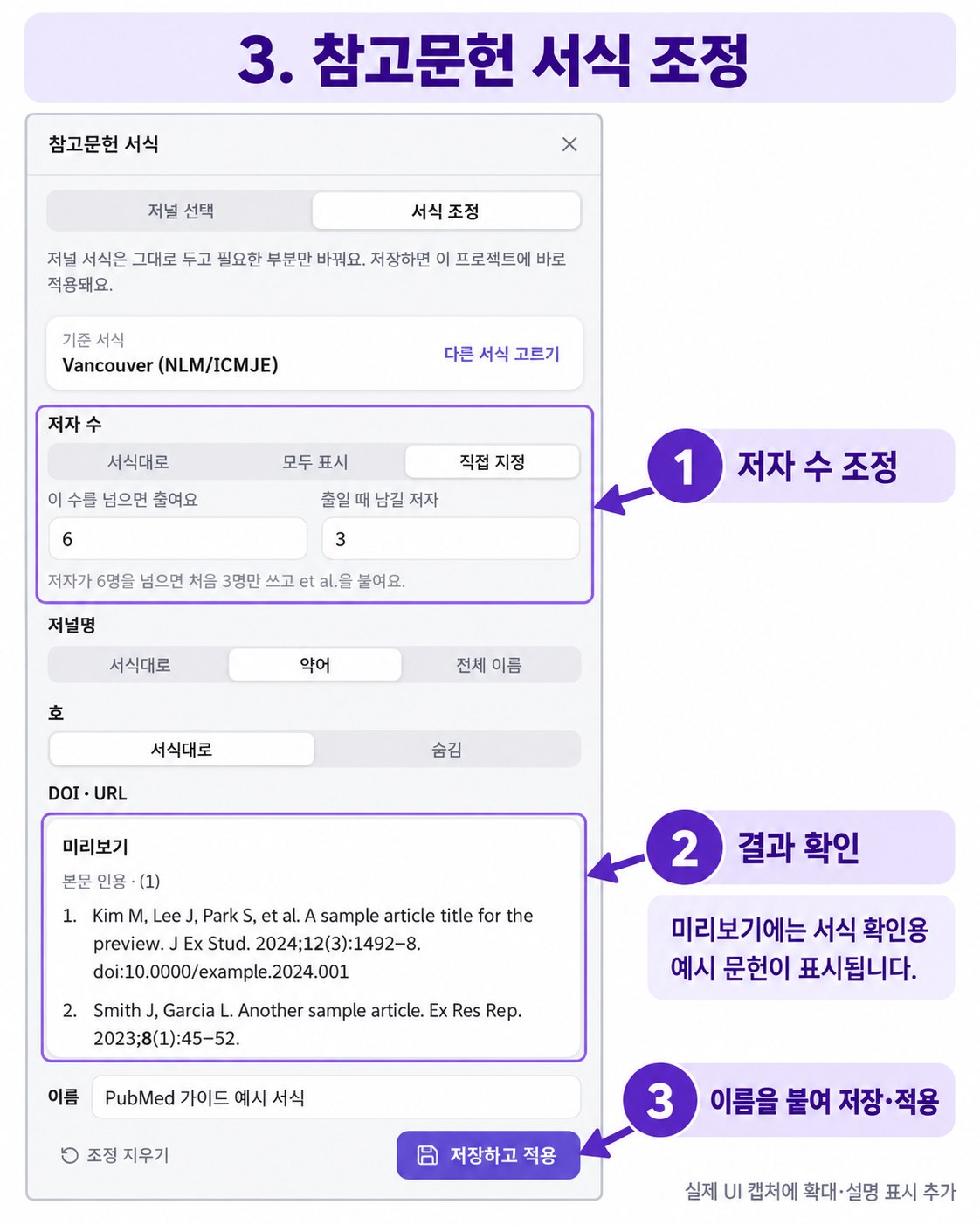
1: adjust author limits and other supported details. 2: inspect the sample preview. 3: name, save and apply the style. AI-edited close-up; the original panel capture is linked below. Original UI capture ↗ Bring existing literature into the same workflow
Use Add in the reference panel to import PDF, BibTeX, RIS or NBIB files, or drop them into the panel. The separate Chrome Connector can also save references from PubMed, PMC and supported publisher pages. Verify imported metadata and duplicates before citing. If you have a PDF, select a passage to ask Paper Chat about its meaning, then check the answer against the original.
Decide whether you need EndNote or Zotero, and choose a reference manager →
Ask about a PDF passage and check the original before citing it →
Use verified papers to connect the Introduction gap and objective →
Check Methods against actual conduct as well as cited methods →
Distinguish organizing references from drafting manuscript sections →
A request to adapt
Example: you selected a results passage in a PDF to check whether it supports a Discussion sentence.
Explain how far this selected PDF passage supports my manuscript’s claim. Point out differences in the study population and design, and limitations I should check in the original paper.
This is an example request. Adapt it to your manuscript and verified facts.
What to check yourself
- Do the title, authors, year and DOI match the original source?
- Have you avoided registering the same paper as duplicate references?
- Does the manuscript’s claim stay within the original results and their scope?
- Have you distinguished saved papers from cited papers and checked that the intended sentence and reference entry correspond?
- Do the exported citation markers and bibliography follow the submission requirements?
Frequently asked questions
Can I change just a few details of a journal style?
Yes. Adjust style supports author limits and et al. rules, journal names, issue and DOI/URL visibility, page ranges and emphasis. Check the preview, give the adjustment a name and save it to apply it to the current project. You can select the saved style again. Compare the final result with the submission requirements yourself.
What should I check if Cite does not work?
Check your editing permission and place the cursor in a body card that accepts citations. If the current title or abstract does not accept citations, move to a card named in the button’s guidance. Saving a paper alone does not insert an in-text citation.
What if the paper does not appear or the search fails?
Check spelling, reduce conditions or try synonyms. For a known paper, search its title or resolve its PMID or DOI and compare the metadata. Retry a failed search and use the link to the same PubMed search to inspect the original results.
Does collecting these results complete a systematic-review search?
No. This example demonstrates finding and citing one paper. A systematic review also needs appropriate databases and a search strategy, recorded search strings and dates, eligibility criteria and a documented review process.
Do PubMed search and AI literature research have the same limits?
Literature search and citation organization are included in the Free plan. AI literature research and analysis count toward AI usage limits. Check remaining usage in your account and the current plan’s access.
Can I import literature I have already collected?
PDF, BibTeX, RIS and NBIB imports are supported. Imported metadata may be incomplete, so compare it with the original and check for duplicates.
Does saving a reference always save its PDF too?
No. Access rights and the site’s delivery method may allow only metadata to be saved. Check the original that you can access and import a PDF you hold if needed.
Sources and further reading
- Literature search, in-text citations and bibliography features
- Official PubMed User Guide: queries, search syntax and full-text access
- Public reference used in the example: Page et al., PRISMA 2020 statement (BMJ, 2021)
- Publisher’s original article: DOI 10.1136/bmj.n71
- Verify the original passage and reference metadata before citing